
Modern Apache Tomcat Management Tool
Key Features
Tomcat Management
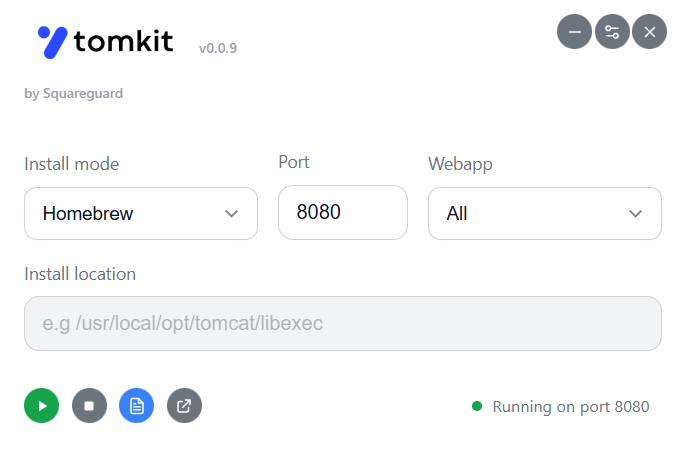
Start and stop Tomcat with a single click. Support for both Homebrew and manual installations
Real-time Log Monitoring
Live tail of Tomcat catalina logs with color-coded log levels for easy debugging
Advanced Search
Find and highlight text in logs with navigation controls and keyboard shortcuts
Log Exports
Export logs to text files with timestamps and clear log files directly from the interface
Port Configuration
Configure custom Tomcat ports and automatically update server configuration
Modern Dark Theme
Optimized dark interface with system tray support and global keyboard shortcuts
Quick Start Guide
Install & Launch
Download the appropriate package for your platform (macOS .dmg, Windows .exe, Linux .AppImage) and launch TomKit.
Configure Server
Select your Tomcat installation type (Homebrew or Manual) and set the installation path if needed.
Start Managing
Use the simple controls to start/stop Tomcat, monitor logs in real-time, and configure ports as needed.
Keyboard Shortcuts
Technical Details
Built With
Electron framework with Node.js backend and modern HTML/CSS/JavaScript frontend for cross-platform compatibility.
System Requirements
macOS 10.15+, Windows 10+, or modern Linux distributions with AppImage support. Node.js v16+ for development.
Prerequisites
Apache Tomcat installed via Homebrew or manual installation with accessible bin/startup.sh and bin/shutdown.sh scripts.
Why TomKit?
"I was getting tired of VS Code & IntelliJ's inconsistent Tomcat integration constantly failing and having to recreate configurations after updates. TomKit was born from the need for a reliable, simple tool that just works - while also being a great opportunity to learn Electron development."
Made with ❤️ for Java developers who just want Tomcat to work
Download & Development
Latest Release
Cross-platform builds available
- macOS (.dmg)
- Windows (.exe)
- Linux (.AppImage)
Open Source
ISC Licensed & Community Driven
- Full source code available
- Contributions welcome
- Build from source
Development
Build & Contribute
- Clone & install deps
- Cross-platform builds
- Issue tracking